

Most massage therapists discover their accessibility gaps the hard way—after losing a client. The conversation usually goes something like this: a new client books online, shows up for their appointment, and realizes the treatment room is upstairs with no elevator. Or they arrive with a service dog and nobody knows the protocol. Or someone with hearing loss misses critical pre-treatment instructions because everything was communicated verbally.
These situations cost you more than one appointment. That client tells others. Your reputation takes a hit. And you realize your intake process completely ignores the roughly 15–20% of adults who have some form of mobility or sensory consideration.
The fix isn't complicated, but it does require rethinking how intake forms actually work. Instead of treating every client the same way, you need conditional pathways that surface specific needs early—then trigger the right operational responses: room assignments, equipment prep, communication adjustments, staff briefings.
The broken assumption that all clients navigate spaces the same way
Traditional intake forms ask about medical conditions and pressure preferences. They rarely ask about accessibility needs unless someone volunteers that information, which plenty of clients hesitate to do. They don't want to seem high-maintenance.
This creates a real information gap. Your therapist walks into a session unprepared. Your front desk doesn't know to offer written instructions instead of verbal ones. Your booking system assigns a second-floor room to someone who uses a walker.
The operational impact compounds fast. A therapist spending an extra 15 minutes relocating equipment means the next appointment runs late. A client who can't safely transfer from their wheelchair to your table means you need entirely different equipment. These aren't edge cases—they're predictable, preventable situations.
Standard intake forms fail because they assume sameness instead of accommodating variety. They treat accessibility as an afterthought. The result is scrambling, improvisation, and service that leaves everyone frustrated.
Building conditional logic into your massage intake accessibility checklist
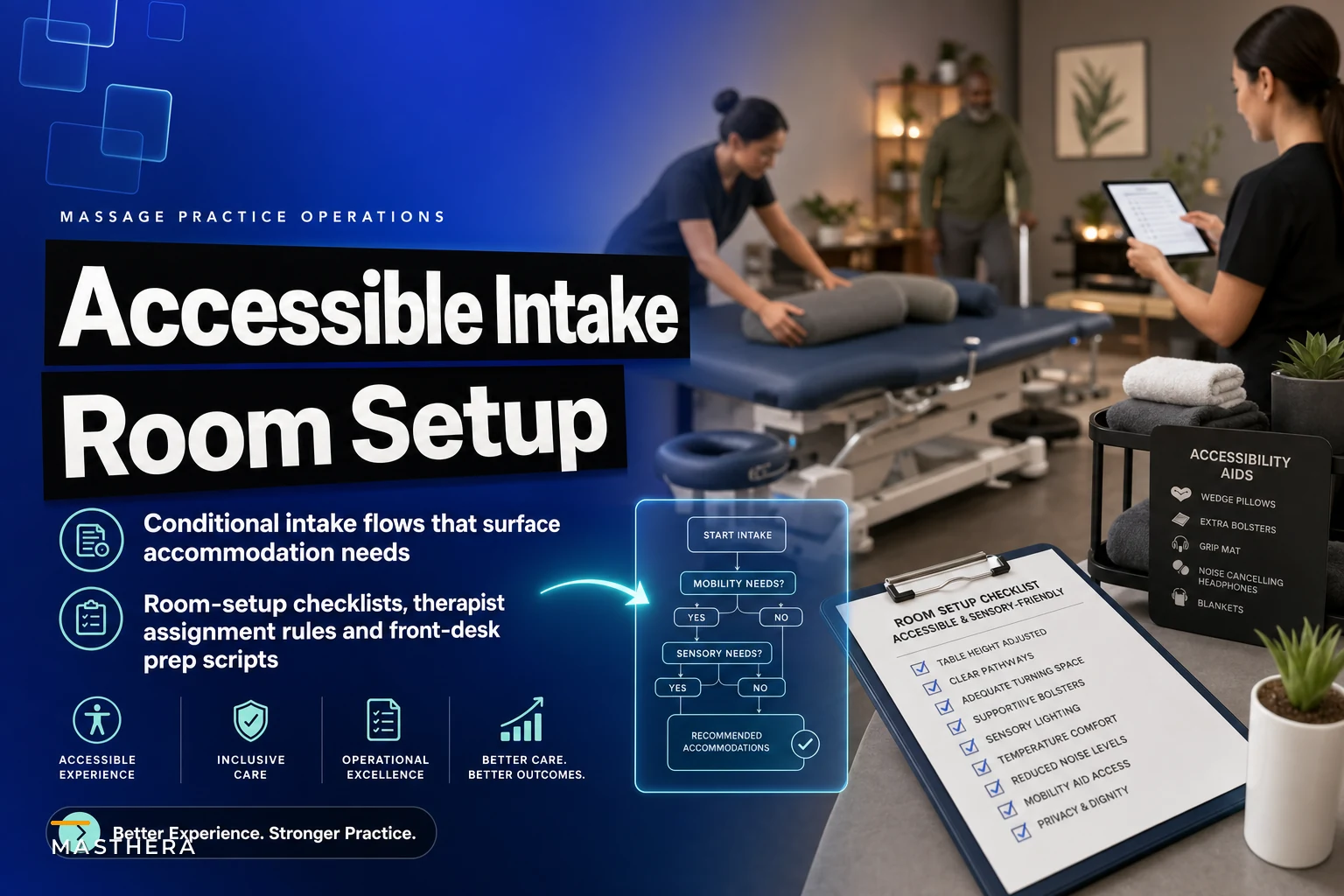
The solution starts with restructuring your intake form to use branching questions. Not every client needs every question, but specific responses should trigger additional fields and operational flags.
Never miss a booking or double-book again.
Masthera helps you schedule, confirm & manage every massage session with ease.
- Unified appointment management
- Automated client reminders
- Therapist calendar coordination
No credit card required
Start with a simple gateway question: "Do you have any mobility, sensory, or accessibility needs we should know about?"
If they select yes, the form expands with specific options:
Mobility considerations:
-
Wheelchair access needed
-
Walker or mobility aid
-
Limited range of motion
-
Difficulty with stairs
-
Need assistance transferring
Sensory considerations:
-
Visual impairment
-
Hearing loss or deafness
-
Service animal
-
Sensitivity to lights or sounds
-
Need for written vs verbal communication
Additional needs:
-
Specific table height requirements
-
Extra time for undressing/dressing
-
Caregiver or assistant present
-
Special positioning needs
-
Communication preferences
Each selection triggers different operational requirements. Someone who uses a wheelchair needs ground-floor room assignment, wider doorways checked, and transfer protocols reviewed. Someone with hearing loss needs written aftercare instructions prepared and visual cues established before the session starts.
The conditional logic prevents overwhelming clients with irrelevant questions while making sure you capture the information that actually matters. This isn't about compliance—it's about being operationally ready.
Put the gateway accessibility question early in your booking flow so flags feed room assignment and scheduling before appointments are confirmed.
The conditional logic prevents overwhelming clients with irrelevant questions while making sure you capture the information that actually matters. This isn't about compliance—it's about being operationally ready.
Room assignment rules that prevent last-minute scrambling
Once your intake form captures accessibility needs, that information has to flow directly into room assignment logic. Manual assignment leads to mistakes, especially during busy periods when staff defaults to habit.
Here's a typical assignment matrix based on accessibility flags:
| Client Need | Room Requirements | Equipment Needed | Staff Prep Time |
|---|---|---|---|
| Wheelchair access | Ground floor, wide door, clear pathways | Transfer board, adjustable table | +10 minutes |
| Walker/cane | Ground floor preferred, grab bars | Lower table height, sturdy armrest | +5 minutes |
| Visual impairment | Consistent layout, clear pathways | Verbal guidance protocols | +5 minutes |
| Hearing loss | Visual cue cards ready | Written instructions | Standard |
| Service animal | Extra floor space, water bowl | Designated resting area | +5 minutes |
These rules need to be absolute, not suggestions. If someone flags wheelchair access needs and your only ground-floor room is already booked, the system should catch that immediately—not after they arrive. That might mean calling to reschedule or moving another client.
The assignment logic extends beyond room selection. It determines which therapist gets assigned, what equipment gets prepped, and how much buffer time gets added to the appointment slot.
Without systematic rules, therapists discover accessibility needs during the session itself. That's when mistakes happen—attempting unsafe transfers, providing inadequate support, or just delivering a subpar experience because nobody was prepared.
Pre-session checklists that change based on flagged needs
Generic prep checklists waste time and miss critical steps. When your intake system flags specific accessibility needs, it should generate a customized checklist for that appointment.
For a client using a wheelchair:
-
Verify ground-floor room assignment
-
Clear all pathways of obstacles, including temporary items like supply carts
-
Set table to lowest height
-
Position transfer board within reach
-
Remove extra chairs to create maneuvering space
-
Test that doorway width accommodates their chair model
-
Prepare written aftercare instructions
-
Brief therapist on transfer assistance protocols
For someone with low vision:
-
Maintain consistent room layout—don't rearrange furniture
-
Adjust lighting levels or prepare adjustable lighting
-
Remove tripping hazards like power cords
-
Place personal items in a consistent location
-
Prepare large-print intake forms if needed
-
Brief therapist on verbal guidance techniques
-
Ensure clear verbal communication is used throughout
These checklists should appear in your operational software around 30 minutes before the appointment, assigned to specific staff members. Front desk handles pathway clearing and room verification. The therapist reviews relevant protocols. Everyone knows their role before the client walks in.
The customization eliminates both oversights and unnecessary over-preparation. You're not running through steps that don't apply, and you're not missing the ones that actually matter.
Front desk scripts that set proper expectations
Your front desk team needs specific language, not just general awareness. Consistent scripting prevents awkward fumbling when accessibility topics come up.
When someone mentions accessibility needs during booking:
"I want to make sure we have everything set up properly for your comfort. Can you tell me more about what accommodations would be helpful? We have ground-floor rooms, adjustable equipment, and our therapists are experienced with various accessibility needs."
When confirming appointments with flagged accessibility needs:
"I'm confirming your appointment tomorrow at 2 PM with Sarah in our ground-floor treatment room. We've noted that you use a wheelchair, and we'll have the pathways clear and transfer equipment ready. Please arrive 5–10 minutes early so we can make sure everything is set up."
When someone arrives with an unmentioned service animal:
"Welcome! I see you have a service animal with you. We have a comfortable spot where they can rest during your session, and we'll make sure there's water available. Is there anything specific your service animal needs while you're in treatment?"
These scripts do a few things at once. They show preparedness without making accessibility feel like a production. They confirm accommodations are in place. They open the door for additional needs without being intrusive.
Many clients with accessibility needs have had dismissive or just plain awkward interactions elsewhere. Professional, prepared communication builds trust faster than you'd expect.
Therapist handoff protocols for accessibility information
The gap between front desk and treatment room causes most accessibility failures. A therapist walking in without context can't deliver proper service regardless of their skill level.
Your handoff should include a brief that covers:
Mobility specifics: Not just "uses wheelchair" but "needs assistance transferring, prefers to transfer from the left side, can bear partial weight"
Communication requirements: "Client reads lips—face them when speaking, speak clearly, confirm understanding for important instructions"
Positioning limitations: "Cannot lie prone due to breathing issues, needs extra bolstering under knees, may need to shift positions mid-session"
Safety considerations: "History of seizures—protocol sheet attached, emergency contact listed"
This information should appear in multiple places: on the appointment screen, on the room assignment sheet, and in a direct handoff conversation. The redundancy matters. People miss things when they're busy.
Some practices worry about privacy when sharing this information internally. But anyone interacting with the client needs to know relevant accommodation details. Just like documenting treatment in SOAP notes, accessibility information requires systematic handling, not ad hoc memory.
Converting one-time accommodations into systematic improvements
Every accessibility request reveals something about how your operation actually runs. A client who struggles with a narrow doorway is pointing at an infrastructure limitation. Someone who couldn't follow post-treatment instructions is showing you a communication gap.
Track patterns over time:
-
Which accommodations get requested most often?
-
What unexpected needs come up during sessions?
-
Which room configurations work best for specific needs?
-
What equipment additions would serve multiple clients?
If you're repeatedly moving furniture for wheelchair access, it might be worth permanently reconfiguring that room. If several clients with hearing loss struggle with verbal instructions, a standard set of visual communication cards is probably overdue.
This data also shapes how you market and grow. Disability communities tend to be tight-knit, and positive experiences get shared. When you consistently accommodate specific needs well, word moves through those networks quickly.
The tracking also matters for membership offerings. Clients who find a practice that genuinely meets their needs become loyal, long-term members. They're not just buying massage—they're buying the confidence that their accommodations will be handled the same way every visit.
The compound effect of accessibility readiness
Proper accessibility workflows do more than serve individual clients better. They change how the whole operation runs.
Staff develops stronger communication habits because they can't rely on assumptions. They learn to confirm understanding, offer choices, and adapt based on what's actually in front of them rather than what they expect.
Operations become more systematic because accessibility requirements force real protocols. You can't improvise when someone's safety depends on proper preparation. That discipline spills over into everything else.
The physical space gets better for everyone too. Wider pathways help parents with strollers. Better lighting benefits anyone navigating your space for the first time. Clear signage helps clients who are anxious about being somewhere new.
Your reputation improves—not just within disability communities but broadly. Businesses that handle this well tend to earn a level of trust that's hard to manufacture through marketing alone.
Technology's role in scaling accessibility operations
Managing conditional intake flows, room assignments, and customized checklists manually works when you're small. But as the practice grows, memory-based protocols and paper systems start failing in predictable ways.
This is where AI-powered operational software shifts accessibility management from a recurring burden into something that mostly runs itself. Instead of staff remembering to check for accessibility flags, the system generates the right checklists automatically. Instead of manually assigning rooms, the software enforces rules based on what the client actually flagged.
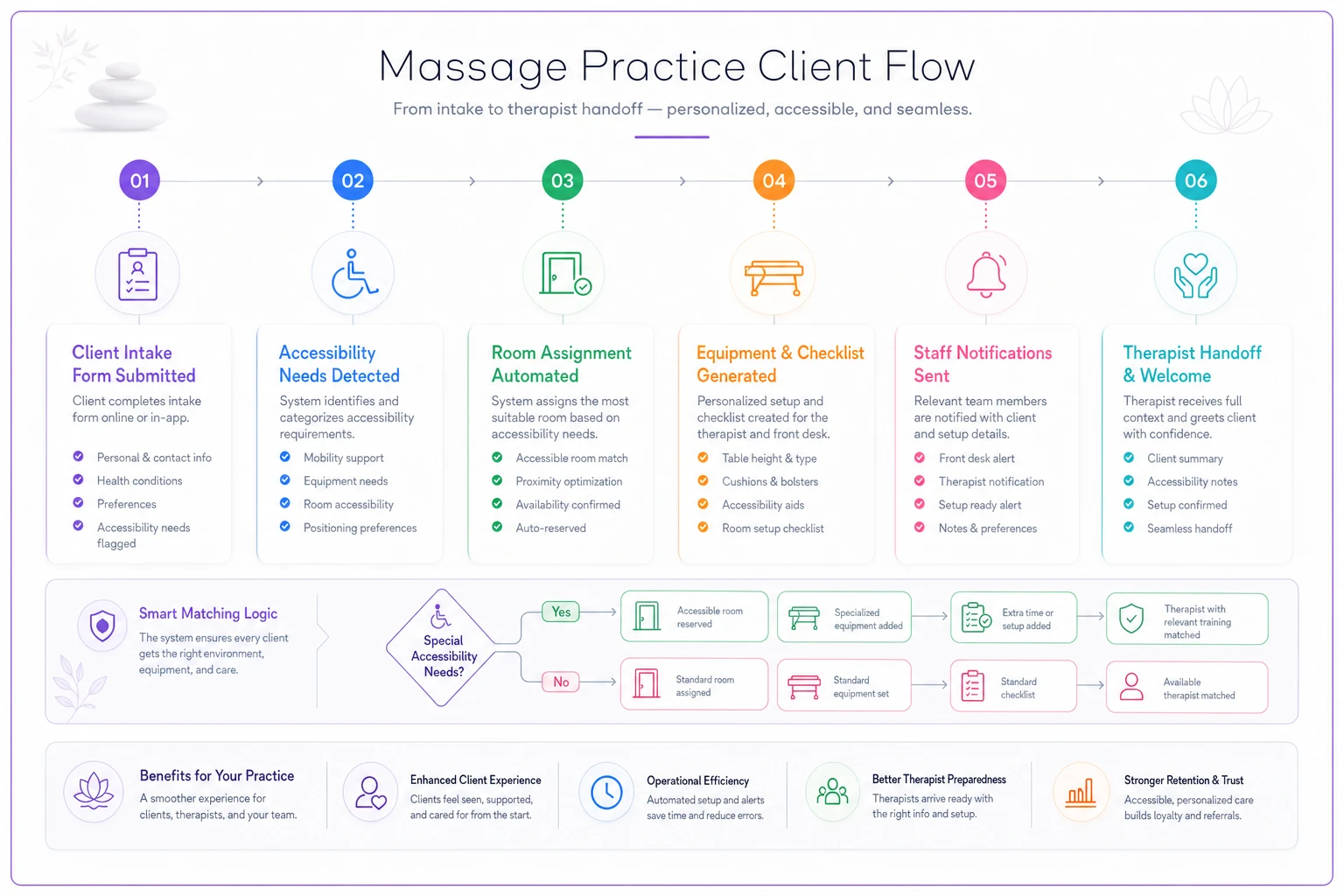
When a client indicates they use a wheelchair, the system can immediately flag appropriate room options, generate a customized prep checklist, adjust appointment duration if needed, notify relevant staff, and prepare handoff information—all without anyone having to manually coordinate those steps.
Here's a simple visual of how that intake-to-operations flow works:
That kind of automation matters most during busy periods, when dropped balls are most likely. It also creates consistency regardless of who's working the front desk on a given day. A new hire following system-generated prompts performs closer to your best staff member than you'd get without the structure.
Over time, the data tells you things you wouldn't notice otherwise—patterns in accommodation requests, bottlenecks in your accessibility service, and whether the changes you've made are actually working.
Starting your accessibility transformation
You don't need to build a perfect system on day one. Start with the intake form—add the conditional questions that surface needs early. Build basic room assignment rules. Create simple checklists for the most common accommodations.
Test it with willing clients. Ask specifically about the accessibility experience, not just the massage. What worked? What felt awkward? What was missing?
Expect the first version to need refinement. Scripts can feel stilted at first. Checklists miss steps. Room assignments don't account for every scenario. That's fine—the point of having a system is that you can improve it consistently instead of repeating the same mistakes.
Train your team on the why, not just the what. When staff understands that accessibility readiness reduces stress, prevents delays, and improves client satisfaction, they take the protocols seriously rather than treating them as extra work.
Accessibility isn't a compliance checkbox. It affects roughly one in five potential clients. The practices that handle it well don't just capture more business—they operate at a noticeably higher standard across the board.
The massage intake accessibility checklist you build becomes more than a form. It becomes the foundation of an operation that anticipates needs, prepares thoroughly, and delivers consistently regardless of what accommodations clients require. Clients experience smooth, professional service without ever seeing the preparation that made it possible. They don't need to know about the conditional logic or the automated checklists. They just need to feel welcomed, accommodated, and cared for from booking through follow-up.
That's when accessibility stops being about special accommodations and starts being simply how professional massage practices operate.
Ready to elevate your massage therapy business?
Join hundreds of therapists using Masthera to save time, reduce scheduling conflicts, and enhance client satisfaction.