

Most studio owners don't realize they're running an integration stack until something quietly stops working. Your online booking says a slot is open, but the calendar on the front desk shows it as taken. A gift card gets redeemed twice. A new client fills out intake, but it never shows up in the practitioner's view. Membership charges run, but the CRM thinks the client churned. None of these are dramatic failures. They just erode trust, waste front-desk time, and cost money in small, invisible amounts.
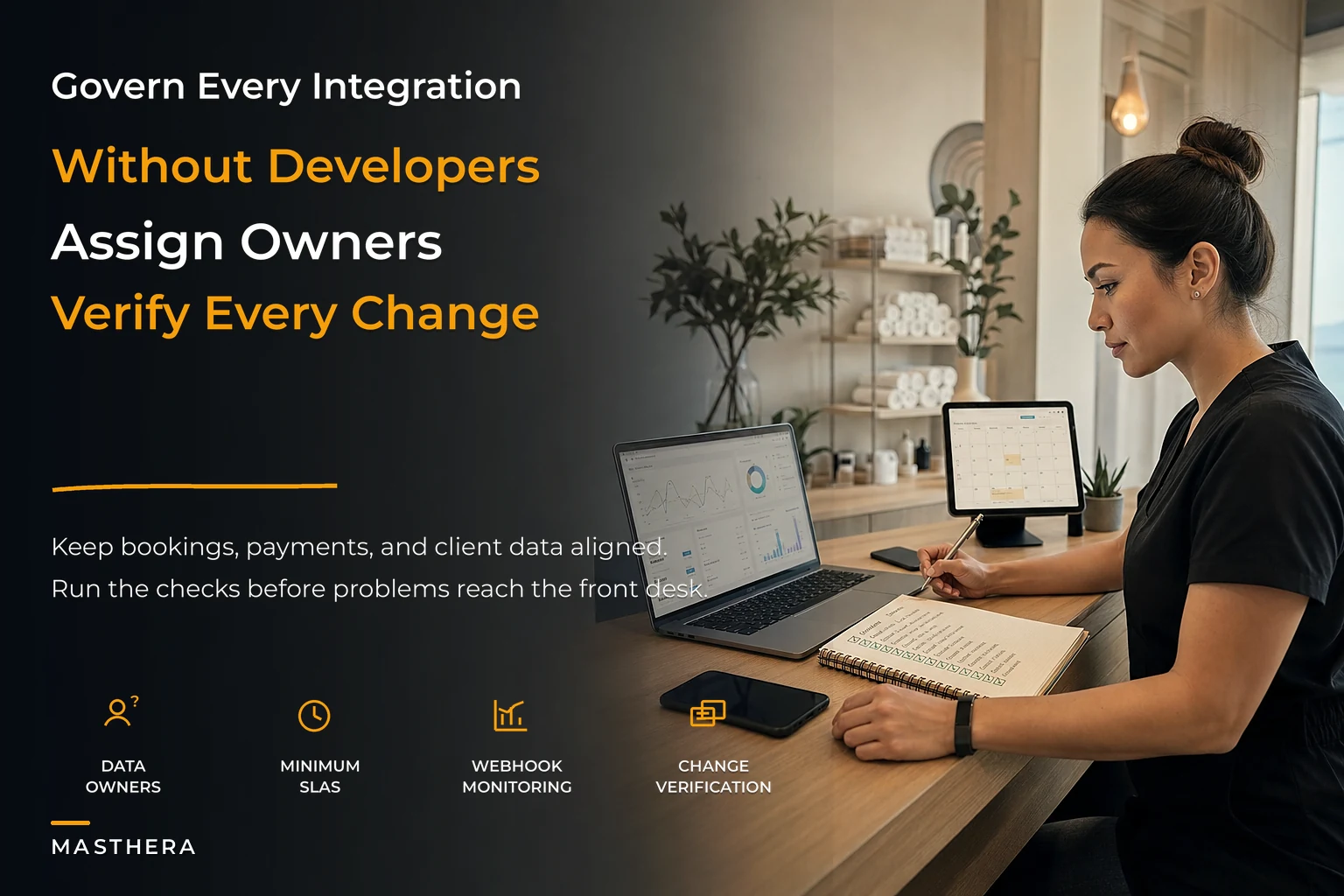
Once you're running more than two or three connected tools — booking, POS, email/SMS, intake, maybe accounting — you've built a system. And systems need governance, not just vibes. The good news is you don't need a developer. You need a handful of documents, a monthly rhythm, and a clear sense of who owns what when something breaks.
This is the playbook I'd hand to an owner who feels like their tech "mostly works" but can't explain why it works or what happens when it doesn't.
Why integration problems hide so well in wellness studios
Integrations rarely fail loudly. They fail at the edges — the 3% of bookings with an odd time zone, the client who pays with a package and a card, the appointment that gets rescheduled twice. Because the common path works fine, owners assume the whole thing is healthy.
The failure surface also grows faster than the tool count. Two tools have one connection to watch. Four tools can have six. By the time you've got booking, payments, intake forms, email marketing, accounting, and a review-request tool, you're maintaining a web of handoffs that no single person fully understands. The front desk knows the symptoms. Nobody owns the plumbing.
The second reason these problems hide: the person who set up the integrations is usually long gone, or it was the owner doing it at 11pm during the first month of opening. The settings work until a vendor pushes an update, a plan changes, or an API key silently expires. Then you're debugging live, during a busy Saturday, with a client standing at the desk.
Integration governance is really just the discipline of knowing — before anything breaks — where your data lives, who's responsible, and how you'd catch a problem early.
Start with a data-ownership matrix (the one document that prevents most chaos)
Before you touch SLAs or monitoring, you need to answer a deceptively simple question: for each piece of data, which system is the source of truth?
Never miss a booking or double-book again.
Masthera helps you schedule, confirm & manage every massage session with ease.
- Unified appointment management
- Automated client reminders
- Therapist calendar coordination
No credit card required
This matters because duplication is where studios bleed. If both your booking tool and your CRM think they "own" the client's email address, and someone edits it in one place, you now have two versions with no rule for which one wins. Multiply that across phone numbers, package balances, appointment history, and consent flags, and you've got the quiet source of half your front-desk confusion.
A data-ownership matrix is a one-page table. Here's a realistic version for a single-location studio:
| Data type | Source of truth | Flows into | Who can edit | Sync direction |
|---|---|---|---|---|
| Client contact info | Booking system | CRM, email tool | Front desk | One-way: booking → others |
| Appointment history | Booking system | CRM, reporting | System only | One-way |
| Package / gift card balance | POS | Booking system | Manager only | One-way: POS → booking |
| Intake & consent forms | Intake tool | Client record / SOAP | Practitioner | One-way |
| Membership status | Payments/billing | CRM, booking | Manager only | One-way |
| Marketing consent | CRM | Email/SMS tool | Front desk | One-way: CRM → marketing |
The rule that saves you: data should have one owner and flow one direction. Two-way syncs feel convenient and cause the most painful conflicts. When two systems can both edit the same field, you eventually get a "last write wins" collision that silently overwrites something important.
Worth calling out — the field that causes the most trouble is almost always the package or gift-card balance, because it touches both money and booking. If you only harden one row of this matrix, harden that one.
Pin the matrix in a shared staff folder and update it whenever you change a setting so everyone knows who owns each field.
If you're in the middle of choosing or switching platforms, this matrix doubles as your migration map. It pairs naturally with a proper practice-management selection and migration runbook — define ownership before you move data, not after you discover duplicates.
Minimum SLA templates you can actually enforce
Owners hear "SLA" and assume it's an enterprise thing requiring lawyers. In practice, an SLA for a small studio is just a short written note of what you expect from each vendor and what you'll do when they don't deliver. Most vendors publish some version of this; your job is to pull out the parts that matter and write them down in plain language.
You don't need a legal document. You need a reference sheet so that when payments go down at 9am on a Monday, you're not Googling "[vendor] down" in a panic. For each critical tool, capture:
-
What it does for you (one line — "takes online payments and charges memberships")
-
What counts as "down" for you (not their definition — yours: "clients can't book or pay")
-
Their stated uptime / support response (from their docs or plan page)
-
Support channel + hours (chat, email, phone — and when they actually answer)
-
Your fallback (what the front desk does manually while it's broken)
-
Max tolerable downtime before you escalate or consider switching
The SLA that matters most isn't the vendor's — it's yours. The real question is "how long can my studio run without this tool before it costs me actual bookings?" Your booking and payments tools might need to be up every minute of peak hours. Your review-request tool could be down for a week and nobody'd notice. Rank tools by that, not by how expensive they are.
A simple tiering approach works well:
-
Tier 1 — can't operate without it booking, payments. Needs a manual fallback written and tested.
-
Tier 2 — degraded but functional intake, SOAP notes. Can limp along a day on paper.
-
Tier 3 — nice to have marketing, reviews, reporting. Can be down for days.
Write the manual fallback for Tier 1 now, while nothing is broken. "If payments are down: take card manually via [backup reader], log in the day sheet, reconcile tonight." That one sentence saves a chaotic morning.
A webhook monitoring checklist for non-technical owners
Webhooks are the invisible messengers between your tools — the thing that tells your CRM "a booking just happened" or tells your accounting tool "a payment cleared." When a webhook silently fails, two systems drift apart and nobody gets an alert. This is the single most common cause of "my numbers don't match" problems.
You don't need to understand the code. You need to know how to detect drift. Pick a handful of events that should always travel from one system to another, then spot-check that they actually arrived.
-
Pick 3–5 "canary" events — a new booking, a completed payment, a new intake form, a membership charge, a cancellation.
-
For each, confirm it lands downstream. Book a test appointment under your own name and check it appears in the calendar, the CRM, and the reminder sequence.
-
Check timestamps, not just presence. A booking that shows up 40 minutes late means the sync is lagging, which breaks same-day reminders.
-
Watch for the "missing middle." If Monday and Wednesday synced but Tuesday didn't, something failed quietly — look for gaps, not just totals.
-
Verify counts match across systems weekly. Bookings in your scheduler should equal bookings in your reporting. A gap of even two or three is a signal worth investigating.
-
Keep an eye on bounced or expired keys. Many integrations use access keys that expire; note renewal dates somewhere visible.
A realistic example of how this breaks: a studio connected its payment tool to its accounting software, and for about seven weeks, roughly one in twelve transactions didn't flow through because of a quiet sync hiccup. Nothing errored out. The owner only found it at month-end when deposits didn't match the books by a few hundred dollars. A weekly count check would've caught it in week one instead of eating an afternoon of reconciliation.
The core habit: reconcile by count, regularly, on purpose. Don't wait for the numbers to feel wrong.
The monthly integration-health check
Governance that only exists on paper decays fast. What actually keeps a studio's stack healthy is a short recurring ritual — 30 to 45 minutes once a month, ideally the same day you do your month-end close so the two reinforce each other.
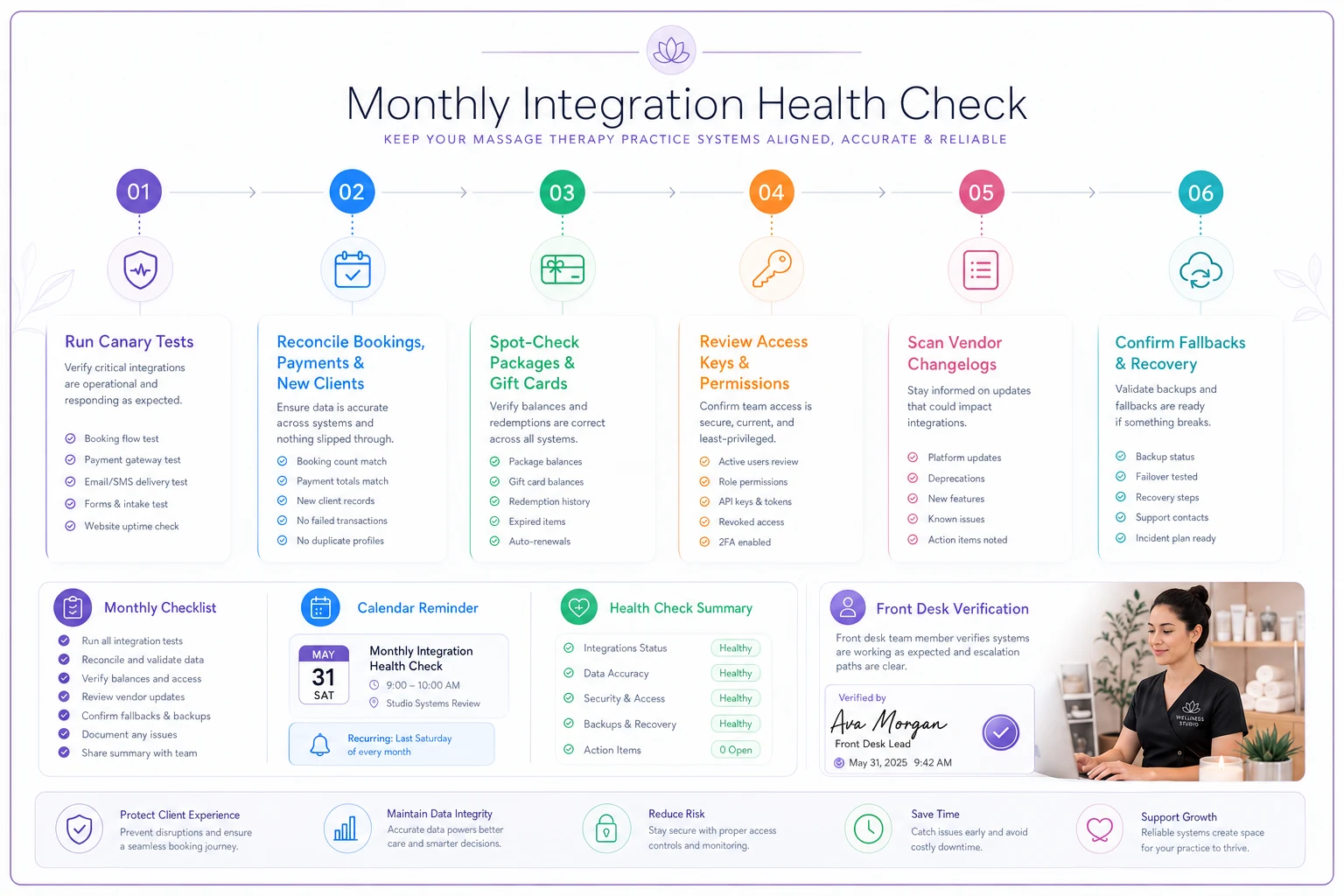
Here's the monthly run, in order:
-
Run the canary tests. Book, pay, and submit intake under a test name. Confirm each one lands everywhere it should, with correct timing.
-
Reconcile the big three counts. Bookings, payments, and new clients — compare across your booking tool, payments, and reporting. Note any gaps.
-
Check the money-touching fields. Spot-check five package or gift-card balances against what the POS says. This is where silent errors hurt most.
-
Review access keys and permissions. Any expiring soon? Any staff who left still have logins to connected tools?
-
Scan vendor status and changelog. Did any Tier 1 tool announce an update or deprecation? Updates are the most common trigger for sudden breakage.
-
Confirm your fallbacks still work. Is the backup card reader charged? Does anyone actually remember the paper-intake process?
Here's a quick visual of that monthly run.
Breakage clusters around change. A vendor update, a plan upgrade, a new staff member, a changed password — these are when integrations fail, not random Tuesdays. If you time your health check to follow any significant change, you catch issues while you still remember what changed.
This monthly rhythm also feeds your reporting. If your numbers can't be trusted, no dashboard means much. For studios building out proper analytics, this health check is the foundation underneath a data and reporting strategy for small wellness chains — clean integrations are what make the reports actually reflect reality.
Pre-change verification: the step everyone skips
Most integration disasters aren't caused by neglect. They're caused by a well-meaning change — upgrading a plan, switching an email tool, reconnecting an app after a password reset, enabling some "helpful" new feature. The change itself is fine. The problem is nobody checked what it touched.
Before you change anything connected to your stack, run a two-minute verification:
-
What does this touch? Pull up your data-ownership matrix and find every row involving this tool.
-
Is it Tier 1? If yes, don't do it during business hours. Do it when you can test and fix without pressure.
-
What's my rollback? Can you undo this? Write down the current settings before changing them. Screenshot the config.
-
What test proves it worked? Decide before the change what you'll check after. Usually it's just running the canary test for anything this tool connects to.
-
Who needs to know? If the front desk should watch for weirdness today, tell them.
A common and avoidable failure: an owner switches email providers to save money, reconnects it to the booking tool, and the automated post-visit sequence quietly stops firing. Rebooking rates slide a little. It takes three weeks to notice, and by then you've lost a chunk of follow-up bookings you won't recover. A single canary test — "did my test booking trigger the follow-up email?" — would've caught it in five minutes.
The habit is simple to state and hard to practice: never change a connected tool without deciding, in advance, how you'll prove it still works.
When this level of governance makes sense — and when it's overkill
When it makes sense: You're running three or more connected tools, you handle packages or memberships, or you have more than one person touching the systems. The moment money flows automatically between tools, you need governance. The moment a staff member who isn't you can edit client data, you need the ownership matrix.
When it's lighter: A solo practitioner with one booking tool and a manual payment reader doesn't need webhook monitoring. One canary test a month and a note of vendor support numbers is plenty. Don't build a governance program for a stack that doesn't exist yet.
Who should slow down before over-engineering this: If you're spending more time monitoring integrations than they save you, the stack is too complex for your size. The answer isn't more governance — it's fewer tools. A smaller number of well-connected systems beats a sprawling set of apps you can't keep in sync. Simplicity is a governance strategy too.
A real scenario: the three-room studio that stopped losing money at the seams
A single-location studio with three treatment rooms ran booking, a separate payments tool, an intake app, and an email marketing platform. On the surface, everything worked. Underneath, three small leaks were running at once: about one in ten package redemptions weren't syncing the balance back to booking, the post-visit email sequence had silently broken after a plan change, and monthly deposits were off from the books by a few hundred dollars most months.
None of it was catastrophic on its own. Added up, it was somewhere around $400–$600 a month in reconciliation time, over-redeemed packages, and softer rebooking rates — closer to a thousand dollars some months once you counted the lost follow-up bookings.
The fix wasn't technical. The owner built a one-page ownership matrix, wrote a short SLA sheet for the two Tier 1 tools, and started a 40-minute monthly health check tied to month-end. Within two cycles, the package-balance drift was caught and corrected, the broken email sequence was found and reconnected, and the deposit mismatch disappeared because counts were being reconciled on purpose instead of discovered by accident. Nothing dramatic — just a studio that stopped quietly leaking.
The mindset shift that matters
Integration governance for a wellness studio isn't about becoming technical. It's about treating your connected tools as a single system with owners, rules, and a maintenance rhythm — the same way you'd treat your laundry cycle or your room-turnover process. Vendors will push updates, plans will shift, staff will come and go. What protects you isn't picking perfect software; it's having a light, repeatable way to know where your data lives and how you'd catch a problem before a client does.
Start with the one-page matrix. Add the SLA sheet for your two most critical tools. Run the canary test once a month. That's most of the value, and none of it requires a developer. The studios that stay out of trouble aren't the ones with the fanciest stack — they're the ones who know, on any given day, exactly what's talking to what and what they'd do if it stopped.
Integration governance for a wellness studio isn't about becoming technical. It's about treating your connected tools as a single system with owners, rules, and a maintenance rhythm — the same way you'd treat your laundry cycle or your room-turnover process. Vendors will push updates, plans will shift, staff will come and go. What protects you isn't picking perfect software; it's having a light, repeatable way to know where your data lives and how you'd catch a problem before a client does.
Start with the one-page matrix. Add the SLA sheet for your two most critical tools. Run the canary test once a month. That's most of the value, and none of it requires a developer. The studios that stay out of trouble aren't the ones with the fanciest stack — they're the ones who know, on any given day, exactly what's talking to what and what they'd do if it stopped.
Ready to elevate your massage therapy business?
Join hundreds of therapists using Masthera to save time, reduce scheduling conflicts, and enhance client satisfaction.