



Switching practice-management software is one of those projects that looks simple on paper and turns into a nightmare in practice. You sign up for the shiny new platform, someone promises "easy import," and three weeks later your front desk is staring at a spreadsheet trying to figure out why 40 clients have duplicate profiles and why a chunk of prepaid package balances just vanished.
Nobody tells you upfront that the software choice matters way less than the process around it. Most studios that lose data don't lose it because they picked the wrong system — they lose it because they treated the move as a one-day copy-paste job instead of a phased operation with actual checkpoints. And the fallout isn't just annoying. When a client shows up expecting three sessions left on a package that now reads zero, you're not debugging a database. You're rebuilding trust at the front desk while someone waits in your lobby.
This is the runbook I wish more studio owners had before they clicked "migrate." It covers how to pick a platform without getting sold by a demo, how to audit your data before you touch anything, how to run the actual cutover, and how to keep your staff from panicking mid-transition. It's long on purpose — migrations are one of the few operational projects where being slow and methodical is literally the whole point.
Why studios lose data during migrations (it's rarely the import tool)
The migration itself is almost never where things break. The damage usually happens before you export anything, because your existing data is messier than you think.
Here's what a typical situation looks like: a studio has been running for six years on an older booking platform. Over that time, three different front-desk people entered client info their own way. Some clients have phone numbers sitting in the notes field. Some have two profiles because they booked once under a nickname. Package purchases were logged inconsistently — sometimes as a product, sometimes as a discounted service, sometimes just written in a note. Membership pauses were handled by "just not charging them this month" with no actual record.
None of that is a problem while you're inside the old system, because your staff remembers the workarounds. The moment you export into a clean new schema, all those undocumented shortcuts become corrupted or missing data. The new system doesn't know that "hold - see Jamie" in the notes means the membership is frozen. It just imports a note and charges the card.
A solo therapist with 200 clients can eyeball the mess and fix it manually. A three-room studio with 1,800 active clients, four therapists, gift cards, packages, and memberships cannot. The volume hides the errors until a client hits one. And because these errors surface one at a time over weeks, you never get a clean "the migration failed" moment — you get a slow drip of frustrated clients that erodes confidence in the whole switch.
So the real work isn't the export. It's deciding what's worth moving, cleaning it first, and proving each piece landed correctly on the other side.
Step one: the decision matrix (pick the platform for your operation, not the demo)
Every practice-management demo looks great. That's their job. The mistake studios make is evaluating platforms on features they'll use twice a year instead of the daily workflows that actually determine whether the front desk survives.
Never miss a booking or double-book again.
Masthera helps you schedule, confirm & manage every massage session with ease.
- Unified appointment management
- Automated client reminders
- Therapist calendar coordination
No credit card required
Build a simple weighted decision matrix before you look at a single demo. Score each candidate on what matters to your operation, not a generic feature checklist. Here's a structure that's worked well for multi-therapist studios:
| Criteria | Weight | Why it matters for studios |
|---|---|---|
| Data import quality (packages, memberships, history) | 25% | This is where migrations die. Ask for a real test import, not a promise. |
| Package & gift-card accounting | 15% | If balances don't migrate cleanly, you're refunding disputes for months |
| Recurring billing / membership handling | 15% | Failed or duplicated charges after migration destroy trust fast |
| Front-desk daily workflow speed | 15% | The screen your staff touches 100x a day matters more than any report |
| SOAP notes / clinical documentation | 10% | Compliance and continuity of care depend on notes moving intact |
| Reporting & KPIs | 10% | You need visibility from day one, not after a setup project |
| Support responsiveness during migration | 5% | The week you cut over is exactly when you'll need them |
| Contract flexibility / export rights | 5% | Make sure you can leave this one too, someday |
Weight these however your studio actually runs. A clinical rehab practice should push SOAP notes and documentation higher. A high-volume relaxation studio with heavy package sales should weight package accounting up.
The single most important line in that table is data import quality, and here's the thing most owners skip: demand a real test import before you sign anything. Give the vendor a sample export of your actual data — anonymized if you want — and make them import it into a sandbox. Watch what happens to your packages and memberships specifically. If they can't or won't do a test import, that's your answer.
When a platform genuinely fits, the daily workflow feels obvious to your front desk without a manual. When it doesn't, no amount of features saves you — your staff quietly builds workarounds, and you're back to the exact mess you were trying to escape.
When switching platforms is actually a bad idea
Not every frustration justifies a migration. Switching makes sense when your current system genuinely can't handle your volume, is missing something structural like proper membership billing or documentation, or is being sunset by the vendor. It's a bad idea when your real problem is a broken workflow or undertrained staff - because you'll carry that dysfunction into the new system and blame the software again in a year. If your current platform mostly works and you're chasing a slightly nicer interface, the migration risk almost never pays off.
Step two: the pre-migration audit (clean before you move)
This is the phase everyone wants to skip and the one that decides whether your migration succeeds. The audit is where you find six years of accumulated mess before it becomes corrupted data on the new platform.
Export and store a full, offline backup before you touch any live data.
Work through your current data in categories, because different data types fail in different ways.
Client records. Run a duplicate check on names, phone numbers, and emails. Merge duplicates in the old system before export. Standardize phone number formats. Decide what to do with inactive clients — someone who hasn't booked in four years probably doesn't need to make the trip. Many studios trim their client count by 20–30% just by dropping stale records, which makes the whole migration faster and cheaper.
Financial and package balances. Highest-risk category. Pull a full report of every outstanding package balance, gift-card balance, and prepaid credit. Export it to a separate spreadsheet and treat it as your source of truth. You will reconcile against this after migration. Do not trust that these numbers will move automatically — verify them by hand later.
Memberships and recurring billing. List every active membership, its price, billing date, and any special status — paused, discounted, grandfathered pricing. This is where "just didn't charge them" workarounds bite you. Document every exception explicitly now, while you still remember why it exists.
Clinical notes. If you're moving SOAP notes, confirm the new system can actually store them in a usable, searchable format — not just as attached PDFs you can never filter. Continuity of care and compliance both depend on this. If you're not confident how your documentation should be structured going in, it's worth sorting out your SOAP-notes system before the move, not after.
Here's a pre-migration audit checklist you can work straight through:
-
[ ] Duplicate client profiles identified and merged
-
[ ] Phone/email formats standardized
-
[ ] Inactive clients flagged for archive-or-drop decision
-
[ ] Full export of all package balances saved separately
-
[ ] Full export of gift-card balances saved separately
-
[ ] Active memberships listed with billing dates and exceptions
-
[ ] Grandfathered/discounted pricing documented
-
[ ] SOAP notes format confirmed compatible with new system
-
[ ] Appointment history date range decided (how far back to move)
-
[ ] Card-on-file / payment token migration path confirmed with both vendors
-
[ ] A full backup of the old system exported and stored offline
That last item is non-negotiable. Before you touch anything, export a complete backup and store it somewhere the migration can't reach. If everything goes wrong, that backup is the difference between a rough week and a closed business.
The card-on-file trap nobody warns you about
Stored payment methods usually don't migrate, and this catches almost everyone.
Card data lives with your payment processor, and it's often tokenized in a way that's tied to your old platform. When you switch systems, those tokens frequently don't come with you — which means every membership client's card-on-file evaporates. If you don't plan for this, your first billing cycle on the new platform fails across dozens of members at once, and you spend a week chasing everyone to re-enter their card.
Sometimes the processor can transfer tokens if the new platform uses the same underlying processor. Sometimes they can't, and you have to re-collect cards from every recurring client. Either way, find out before you migrate, not on billing day. If you have to re-collect, build a friendly heads-up sequence: tell members you're upgrading systems, that they'll need to confirm their payment info once, and make it a two-minute task. Framing it as an upgrade instead of an inconvenience keeps churn low.
Step three: the migration runbook (the actual cutover)
Once your data is clean and audited, the cutover itself should be methodical and boring. Pick a slow window — the quietest week you have, ideally with a light booking day right after so you can catch problems before volume returns.
-
Freeze changes in the old system. Pick a cutoff date. After it, no new bookings, edits, or purchases go into the old platform. Tell staff clearly.
-
Take a final full backup. Yes, again. Right before export, with the frozen data.
-
Run a test import into the new system's sandbox. Import a subset first — 50 clients across every category (with packages, memberships, notes). Verify everything landed correctly before doing the full run.
-
Do the full import. Bring everything over during your slow window.
-
Reconcile financials against your audit spreadsheet. Go line by line on package balances, gift cards, and memberships. This is the checkpoint that catches silent data loss. Sample at minimum, but reconcile every high-value balance in full.
-
Re-establish payment methods. Confirm card-on-file migrated, or launch your re-collection sequence.
-
Spot-check clinical notes. Open a random sample and confirm they're readable, attributed to the right client, and searchable.
-
Run parallel for a short window. Keep the old system in read-only mode for a few weeks. If a client's history looks wrong on the new platform, you can verify against the old one instead of guessing.
-
Test a full workflow end to end. Book a fake appointment, check the client in, run a payment, write a note, trigger a follow-up. Confirm the whole chain works before real clients hit it.
That last step matters more than any single import check. Your migration isn't successful because the data landed — it's successful because the whole operation still runs from booking through follow-up. If you've already mapped how your booking, intake, billing, and follow-up flow connect, use that map as your test script. Every handoff point in that flow is a place the migration could quietly break.
The reconciliation checkpoint is the whole game
If you take one thing from this article, make it step 5. Reconciling financial balances against a pre-migration snapshot catches the most damaging errors — missing package sessions and wrong gift-card balances that turn into disputes and refunds. Studios that skip it don't find out anything went wrong until clients start complaining, one by one, weeks later. By then you've lost the clean comparison point and you're doing forensic accounting instead of a quick fix.
A quick visual of the cutover workflow can help your team follow the steps.
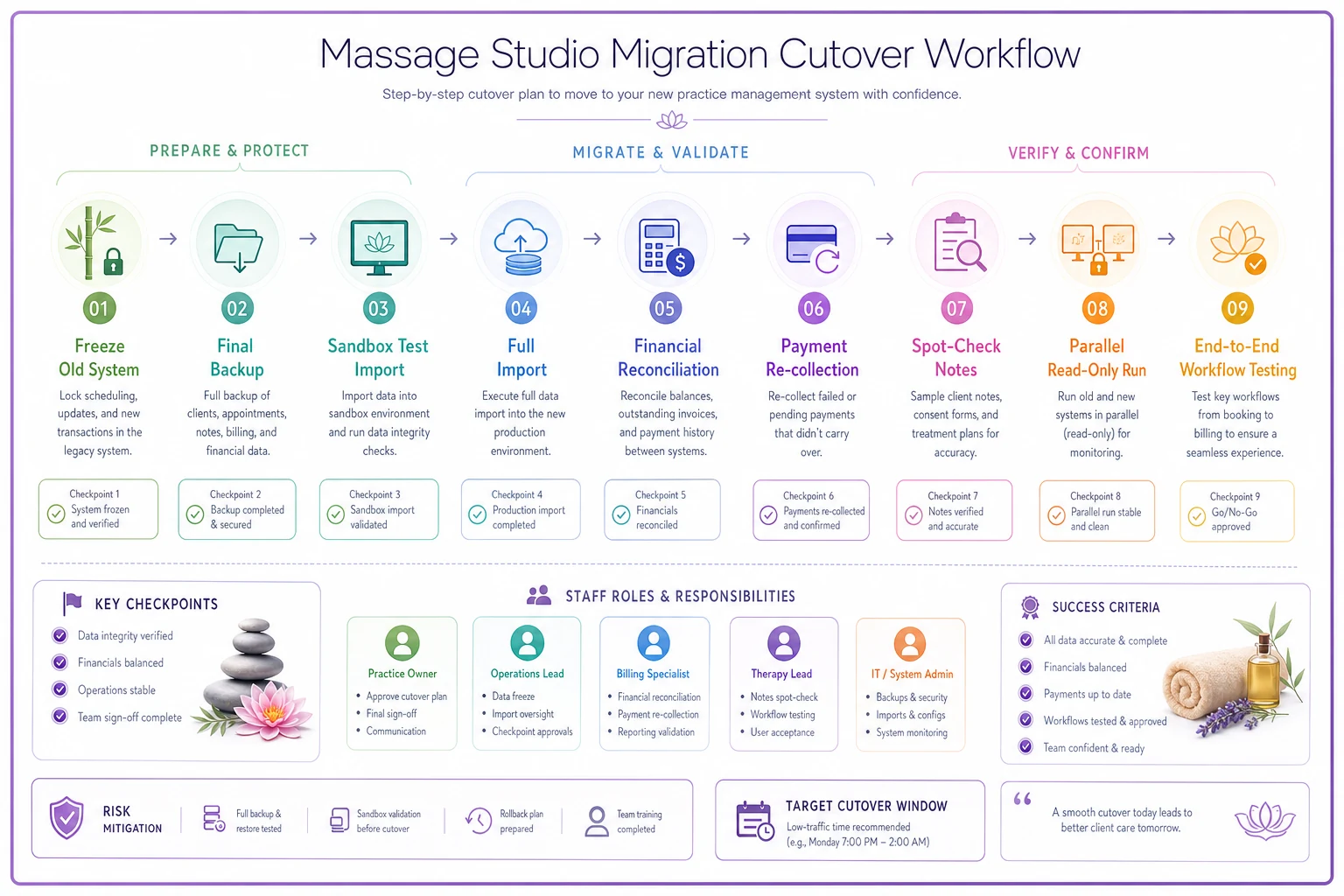
That last step matters more than any single import check. Your migration isn't successful because the data landed — it's successful because the whole operation still runs from booking through follow-up.
Step four: staff change-management (the part that quietly sinks migrations)
A technically perfect migration still fails if your front desk hates the new system. Staff resistance tends to show up as workarounds — people quietly reverting to old habits, keeping side spreadsheets, entering data inconsistently again. Within a few months, your clean new system is as messy as the one you left.
Tell staff early and honestly why you're switching. "The old system couldn't handle our membership billing and it was costing us disputes" lands better than "we're upgrading." Front-desk people feel migration pain most directly, so they need to understand the actual payoff.
Train before cutover, not during. Run a session in the sandbox where staff do the exact daily tasks — book, check in, take payment, look up history — so the real system isn't the first time they touch it. Assign one person as the internal point of contact for questions during the first two weeks; without that, everyone either bugs you or, worse, silently guesses.
Expect a temporary productivity dip. Check-in will be slower for a week or two. If you don't plan for it, staff panic and clients wait. Build some buffer into the schedule during the transition — slightly longer gaps between appointments, an extra person at the desk on busy days.
And watch your KPIs closely through the transition. If check-in time spikes, rebooking rates drop, or no-shows climb right after cutover, something in the new workflow is broken — not just people adjusting. A minimal KPI dashboard gives you the before-and-after comparison to tell the difference between normal adjustment and a real problem you need to fix fast.
A real scenario: what a clean migration actually looks like
Two-location studio, four therapists per site, running on an aging platform that couldn't handle memberships properly. Roughly 1,600 active clients, around 210 active members, healthy package sales — a real mess to move.
Their first instinct was to migrate over a single weekend. Instead, they spent about three weeks on the audit alone. That audit turned up close to 180 duplicate client profiles and around $4k in package balances logged inconsistently enough that they would almost certainly have been lost or mis-imported. They archived roughly 300 clients who hadn't booked in over three years.
The actual cutover happened during their slowest week in January. They ran a test import first, caught that gift-card balances weren't mapping correctly, fixed the field mapping with the vendor, then ran the full import. Card-on-file didn't transfer — different processor — so they ran a re-collection sequence over the two weeks before cutover and got most members re-entered ahead of the first billing cycle.
The result wasn't dramatic, and that's the point. First membership billing cycle ran with only a handful of failed cards, all recoverable. No package disputes surfaced because every high-value balance had been reconciled by hand. Check-in was noticeably slower for about ten days, then settled. The whole thing was boring — which, for a migration, is exactly the outcome you want.
The point: slow, verified, and reversible beats fast
A practice-management migration is not a software task. It's an operational project with real client-trust stakes, and the studios that get burned are almost always the ones that rushed the parts that don't feel urgent — the audit, the reconciliation, the staff prep.
Pick your platform on daily workflow fit and import quality, not demo polish. Clean your data before you move it. Reconcile every balance against a snapshot you took beforehand. Keep the old system readable for a few weeks so you always have a source of truth. Bring your staff along so they don't quietly rebuild the mess you're escaping.
Do it slowly and it's a non-event. Rush it, and you'll spend the next six months explaining to loyal clients where their sessions went.
Ready to elevate your massage therapy business?
Join hundreds of therapists using Masthera to save time, reduce scheduling conflicts, and enhance client satisfaction.